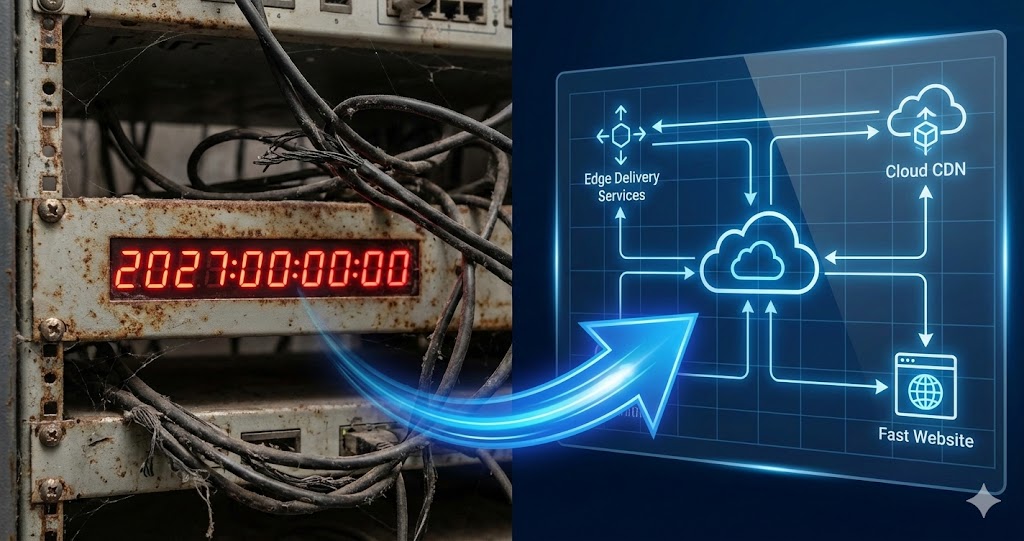

The biggest risk in an Edge Delivery Services migration isn’t the tooling you pick. It’s the mental model you bring to it.
Teams that treat EDS as a version bump (swap the CMS, move the content, port the components, go live) spend their first month confused about why nothing lines up. Teams that recognize it as a different way of delivering the web move fast, because they stop hunting for equivalents that were never there. The migration mechanics rarely derail a project. The mental model does.
So the recalibration is worth doing before you write a line of code. Here it is.
TL;DR: Edge Delivery renders pages at publish time and serves them from the CDN edge, so the per-request stack (Sling, HTL, OSGi, Dispatcher) has no equivalent and is rebuilt as JavaScript blocks over semantic HTML. Your content architecture judgment transfers; your Java implementation does not. The effort moves to content modelling, block design and authoring governance. If you are still choosing between LTS, Cloud Service and Edge Delivery, start with the AEM migration guide.
Throw Out the Version-Bump Picture
When most teams hear “migrate to Edge Delivery Services,” they picture the AEM upgrades they’ve run before: a bigger, more disruptive version of the same thing. New authoring surface, new deployment model, but underneath it, the same job. Your components, your templates, your dispatcher rules, carried forward and adjusted.
That picture is the problem. EDS is not a newer AEM Sites. It’s a different delivery architecture that happens to live under the same Adobe umbrella. Hold onto the old picture and every design decision you make will fight the platform. Drop it, and the platform starts working with you almost immediately.
What Actually Changes: How a Page Gets Built and Served
Traditional AEM does its work per request. A reader asks for a page, and Sling resolves the resource, HTL and your Java components render the HTML, OSGi services run whatever logic sits behind it, and Dispatcher caches the result so the origin doesn’t have to redo it all on the next hit. The page is assembled, on your servers, in response to being asked for.
EDS turns that inside out. Adobe’s architecture notes describe content being processed and rendered when it’s published, not when it’s requested, with finished pages served straight from the CDN edge. Nothing sits at the origin assembling pages on demand, because there’s nothing left to assemble. The work already happened at publish time.
That one change cascades into everything else. Development moves off the server. Instead of Java components rendering HTML, you write lightweight JavaScript blocks that decorate semantic HTML generated from the content source. The stack is vanilla JavaScript, plain CSS, and a GitHub repo, which Adobe’s developer tutorial walks through in an afternoon. No build pipeline, no transpilation step, no Java, no Maven. For a developer whose muscle memory is Sling models and HTL, that isn’t a smaller version of the old job. It’s a different job that produces the same artifact: a fast, well-structured page.
What Carries Over, and What You Rebuild
This is the part that catches people off guard. The thing you’d expect to throw away is the thing you keep, and the thing you’d expect to keep is the thing you rebuild.
Your content architecture instinct transfers completely. How a site is structured, how pages relate, how authors think about components and reuse. That judgment is worth more in an EDS migration than in almost any other kind, because the source content’s structure largely determines how smoothly the whole thing goes.
Your technical implementation mostly doesn’t transfer. Sling models, HTL templates, the OSGi service layer, component dialogs, dispatcher configuration: none of it has a direct EDS equivalent. You rebuild the front end from scratch.
That sounds worse than it is. A from-scratch EDS front end is small, and it’s built in a stack most front-end developers already know. Here’s roughly how the responsibilities line up.
| Concern | Traditional AEM Sites | Edge Delivery Services |
|---|---|---|
| Rendering | Per request, on the origin (Sling + HTL) | At publish time, served from the CDN edge |
| Component logic | Java, OSGi services, Sling models | JavaScript blocks decorating semantic HTML |
| Styling | Client libraries, often build-compiled | Plain CSS, no build step |
| Templates & dialogs | AEM templates, component dialogs | Document structure or the Universal Editor |
| Build & deploy | Maven, package deploys, Cloud Manager | Git push, no build pipeline |
| Caching | Dispatcher rules you configure and tune | CDN by default, little to configure |
| Where the effort goes | Server logic, performance tuning, dispatcher | Content modeling, block design, authoring governance |
Read that last row twice. It’s the whole migration in miniature.
Authoring Changes Too, and It Asks More of Your Content Model
Content teams feel the shift through document-based authoring. Instead of building pages through component dialogs, authors can structure content in documents and tables (Adobe’s Document Authoring, or a similar document surface) and publish from there. It’s lighter and faster for non-technical authors to pick up.
But it asks for more discipline upfront. The dialog system in traditional AEM is a set of guardrails. It constrains what authors can do so the output stays consistent. Take the guardrails away and consistency has to come from somewhere else: a well-designed content model, clear block conventions, and authoring governance you decide on deliberately rather than inherit from the tooling. For teams that want a more structured surface, the Universal Editor sits on top of the same architecture and gives authors in-context editing without handing back the server-side stack.
The Work Doesn’t Shrink. It Moves.
The most common oversell of EDS is “it’s simpler.” That’s half true, and the false half will hurt you if you believe it.
EDS is genuinely lighter where traditional AEM was heavy. You’ll spend far less time on OSGi configuration, JCR query tuning, dispatcher rules, Sling performance, and Java dependency management. Some of that work goes away outright.
It’s heavier where traditional AEM barely asked anything of you. Content schema design, block architecture, authoring governance without dialog constraints, CDN configuration, and above all the cleanliness of your source content structure: that’s where the effort lands now. A messy source site that migrated fine to a new AEM version, because the components hid the mess, will expose every bit of that mess in EDS, where there’s no component layer left to hide behind. Plan for the effort to move rather than vanish, and you’ll scope the project honestly.
The Payoff on the Other Side
Once the shift lands, the day-to-day is fast. Vanilla-JS blocks with no build pipeline mean you change a file, push, and see it live without waiting on a deploy. Performance stops being a phase: the aem.live FAQ says every Edge Delivery site can and should reach a Lighthouse score of 100, and PageSpeed Insights runs on every pull request to hold it there, so nobody burns a sprint chasing a score at the end. And because the front end is small and conventional, a capable front-end developer becomes productive on it in a way that years-deep AEM specialization never made easy.
That’s the quiet argument for EDS. The recalibration is real, but it’s front-loaded. Pay it once, and the delivery model stays fast for everything that comes after.
A Readiness Check Before You Migrate
Because source content structure is the single biggest determinant of how a migration goes, audit it before anything else. A few questions worth answering honestly:
- Is your content consistently structured, or consistently improvised? Pages that follow real patterns map cleanly to blocks. Pages hand-tuned one at a time don’t.
- Do you know what’s actually live? The microsites, the language copies, the campaign pages nobody owns: all of it is in scope until you decide otherwise.
- How much of your “content” is really component configuration? Logic that lived in dialogs and services has to be rethought as content or as a block, not ported.
- Who owns authoring governance once the dialogs are gone? Someone has to define the conventions the tooling used to enforce.
- Are your assets accounted for? DAM assets and their references are their own workstream, not a footnote.
Answer those before you pick tools, and the tool choices get easier. Skip them, and no tool will save the timeline.
Where This Gets Easier
Everything above describes a recalibration your team can absolutely make, and one that pays off. The honest question is who absorbs the cost of making it. If it’s your team, learning on your client’s timeline, the first EDS project carries months of paradigm tax before it ever moves fast.
That’s the gap we built Launch Studio to close. We’ve already internalized the shift and built the tooling around the new paradigm instead of bolting AI onto the old one. The platform treats source-content structuring as a first-class part of the work, scaffolds EDS-native blocks rather than porting server components, and carries the conventions so a lean team ships clean, fast EDS migrations without first spending a quarter unlearning traditional AEM. It’s snap-on, not rip-and-replace: you keep your content and your Adobe investment, and you skip the recalibration tax. That’s what we mean by Agentic Delivery. Strategy and design stay human; the delivery becomes agentic.
If you’re weighing the move at a higher level (LTS versus Cloud Service versus Edge Delivery), we walked through that decision in The AEM 6.5 Migration Decision, Explained, and the dates are on the AEM 6.5 end of life page. And if you want the longer argument for why a platform beats a pile of AI tools on work like this, that’s in Why You Need an Agentic Platform, Not More AI Tools.
If you’re staring down an EDS migration and trying to decide whether your team should absorb the recalibration or hand it off, we’re happy to talk it through. No pitch, just a straight read on what your migration would actually involve. Tell us what you’re running and we’ll come back with specifics. Or if you’d rather see it than read about it, we can walk you through a build in about twenty minutes.